 KINTSUGI
ENTERPRISE
On a shared or production host, Kintsugi runs as a locked, self-healing, audited control — not just an agent guard. Settings sealed behind an admin password, a watchdog that relaunches it if it's killed, and a passive recorder that logs what every human types — all on the same tamper-evident chain.
Honest scope, up front: the lock defeats an AI agent or a normal (non-root) user, and turns a forced shutdown into a logged, alerting, recoverable event. It does not stop root — root can disable any same-machine tool. Kintsugi is designed to make that visible, not impossible.
> the threat it's built for
The default Kintsugi posture protects a single developer from their own agent. The enterprise posture answers a different question: on a box that an agent, a contractor, or a DBA shares — who can turn the safety layer off, and is it noticed when they try?
Three controls, layered, each independently useful:
Lock
Stopping, unhooking, or disabling Kintsugi needs an admin password. An agent or normal user can't quietly turn it off.
Self-heal
A supervisor (systemd / launchd) relaunches the daemon within seconds of a kill — and the gap is logged.
Audit
Every human shell command — no AI agent — lands on the same hash-chained log, secrets redacted before hashing.
1 > the password-locked admin vault — "password to stop"
By default, Kintsugi protects you from your agent — but you can still stop it yourself. kintsugi admin provision flips that: it seals the operational settings behind an admin password, so disabling the safety layer becomes a deliberate, authenticated act.
$ kintsugi admin provision
Set an admin password: ********
Confirm:               ********

  ✓ settings sealed (argon2id verifier · XChaCha20-Poly1305)
  recovery key (store it offline — shown once):
    K9F2-7QXM-4LRT-8WVD-3HJN-6PCE

From now on: stop / unhook / disable needs the password.
$ kintsugi stop
⚠ Kintsugi is locked. Stopping it needs the admin password.
admin password: ********

  ✓ authenticated · daemon stopping
  (this stop is recorded on the audit chain)
how the seal is built
argon2id verifier
The password is never stored. A tuned argon2id(password, salt, params) verifier proves knowledge of it. KDF parameters are pinned and versioned; derived keys are zeroized after use.
XChaCha20-Poly1305 seal
The locked settings are sealed with XChaCha20-Poly1305 — a random 192-bit nonce per seal, with context-bound additional data (AAD) so a sealed blob can't be replayed into a different context.
One-time recovery key
Provisioning emits a recovery key once (the FileVault / BitLocker pattern). Lose the password and the key and the only way out is a privileged local teardown — Kintsugi holds no escrow (spine #5: nothing phones home).
Rotation kills old keys
change_password rotates everything, so an exposed old recovery key dies with the rotation.
authenticating to the daemon — challenge-response
The CLI never sends the password to the daemon. It proves knowledge over a nonce, bound to the exact operation being requested:
CLI  → AuthBegin { op: "shutdown" }
dmn  → Challenge { nonce, salt, kdf_params }
CLI    k     = argon2id(pw, salt, kdf_params)   # = the verifier
CLI    proof = AEAD_tag(k; nonce, aad = nonce ‖ op)
CLI  → Shutdown { op: "shutdown", nonce, proof }
dmn    constant-time compare against its own verifier
dmn  → Ack — daemon exits   # attempt logged to the chain
The proof is the Poly1305 tag of the existing AEAD, keyed by the password verifier with the nonce and operation bound as associated data — so the password never crosses the socket, and a captured proof can't be replayed under a different nonce or for a different action. The challenge is one-shot (consumed on use), and every attempt — success or failure — is a hash-chain event you can alert on. (Per-attempt rate-limiting and sudo-style session tokens are designed but not yet shipped — see the roadmap.)
what's locked, what stays open
The vault gates the settings that could weaken Kintsugi — recording on/off, autostart on/off, stop / uninstall / unhook, enforcement mode (attended · unattended · fail-closed), policy / rule-set selection, panic clear, and retention. Manage them with kintsugi admin set <key> <value> and review the current state with kintsugi admin settings — both password-gated.
honest scope of the lock
One honest sentence, taken straight from the design doc:
Read that as a boundary, not a disclaimer: against the threat that actually shows up — an agent, a script, a normal user reaching for kintsugi stop — the lock holds. Against root, the design goal shifts from prevent to make conspicuous, which is what the watchdog and the chain do next.
2 > the auto-restart watchdog
A lock on the settings means nothing if the daemon can simply be killed. kintsugi service install hands the daemon's lifecycle to the OS supervisor so a kill / pkill relaunches it within seconds.
$ kintsugi service install
  ✓ installed unit: systemd  (Restart=always)
  ✓ watchdog active — a kill relaunches the daemon in seconds

$ pkill -9 kintsugi-daemon
$ kintsugi status
  daemon:  running   (relaunched by the supervisor)
The OS owns the lifecycle
systemd Restart=always, launchd KeepAlive, or a Windows Service auto-restart. To keep the daemon dead, an attacker must disable the supervisor unit — a root/admin operation, not an ordinary kill.
Authenticated stop is the only clean stop
The clean path — kintsugi stop — goes through the daemon's password challenge and is recorded on the chain. A forced kill bypasses that, but the supervisor relaunches the daemon, so the stop is transient, not permanent.
Disabling it is gated
kintsugi service uninstall is itself password-gated — the watchdog can't be removed without authenticating to the vault.
Recommended hardening (deployment)
For the locked posture, run the daemon as a dedicated kintsugi system user on an append-only mount so the audited user can't kill it or erase the log — an ops/deployment step, documented in the security assessment, not an automatic default.
3 > the passive session recorder
Kintsugi's gate guards agents. The recorder answers a separate, compliance-shaped need: a tamper-evident record of what humans type on the box — DBAs, operators, contractors — on the same hash-chained log, classified so a destructive command is flagged. It blocks nothing: it records after the fact.
$ kintsugi record install >> ~/.bashrc   # or ~/.zshrc
  • zsh: add-zsh-hook preexec   • bash: a DEBUG-trap hook

# every command a human runs now fire-and-forgets to:
$ kintsugi ingest   # records the command + cwd + timestamp

$ kintsugi report --since 24h
time      agent   outcome   command
14:02     shell   allow   [catastrophic] dropdb staging
14:09     shell   allow   mysql -p[redacted] -e 'TRUNCATE …'
An rc-file preexec hook
zsh uses native add-zsh-hook preexec; bash uses a DEBUG-trap hook. The snippet is printed for you to append to your rc file — Kintsugi never edits it. It captures the command verbatim plus its working directory and timestamp, onto the same hash-chained log as agent commands.
Records, never blocks the shell
Each command fires a one-shot kintsugi ingest. The recorder is an audit/undo trail, not a gate — it only ever records Allow and never holds or denies a human's command.
Undo a human's mistake — the recoverer
The hook fires before the command runs, so Kintsugi snapshots destructive human commands just-in-time (reflink copy-on-write, predicted paths only). When an operator fat-fingers rm -rf on a data directory, kintsugi undo rolls it back — the same recovery agents get. It is a filesystem recoverer: in-database DROP/TRUNCATE aren't files (use your DB's PITR/backups), and it captures interactive bash/zsh only. Best-effort by design — the filesystem-watcher backstop catches what a race misses; recoverable, not a hard transaction.
Redact before hash
Secrets are redacted at the source, before IPC and before hashing — DB URIs (scheme://user:****@host), mysql -p**** / --password=, redis-cli -a, inline PGPASSWORD= / AWS_SECRET_ACCESS_KEY=, --token= / Authorization: Bearer, curl -u user:pass. Conservative and visible: it over-redacts and always leaves a marker.
Spools across restarts
If the daemon is down, ingest spools to a local record-spool.jsonl (owner-only, 0600, already redacted) next to the event log, and drains it on the next ingest — a buffer, never a second writer. A brief outage doesn't punch a hole in the trail; a crash mid-drain is recovered by re-adopting the leftover file.
Why it matters. The row no incumbent (auditd, tlog) produces cleanly: a dangerous command ran — when, in which directory, the verdict, and on the same tamper-evident chain. And because secrets are redacted before they're written, the audit log can't itself become the breach. Review with kintsugi report --since <range> [--catastrophic-only], filterable by agent, session, and time.
honest limitations — read before you rely on it
The recorder is deliberately scoped. Three caveats are documented, not silently implied:
It classifies the shell, not the SQL
Kintsugi reads the shell command, not SQL inside it. psql -c '…destructive SQL…' is recorded verbatim but may classify as Safe — so in-database DML/DDL auditing (pgAudit, the MySQL audit plugin) remains the system of record for what happened inside the database.
bash heredocs aren't line-for-line
The bash DEBUG-trap hook captures one BASH_COMMAND at a time, so a heredoc body isn't captured line-for-line. zsh preexec captures the full line — recommend zsh for full fidelity.
Tamper-evident, not tamper-proof
Absent an OS-level append-only / WORM mount and a dedicated audit user, a local operator can still purge / redact entries or remove the hook. Kintsugi is tamper-evident, not tamper-proof. For compliance, deploy the event DB on an append-only mount owned by a separate audit account.
4 > the control-room TUI
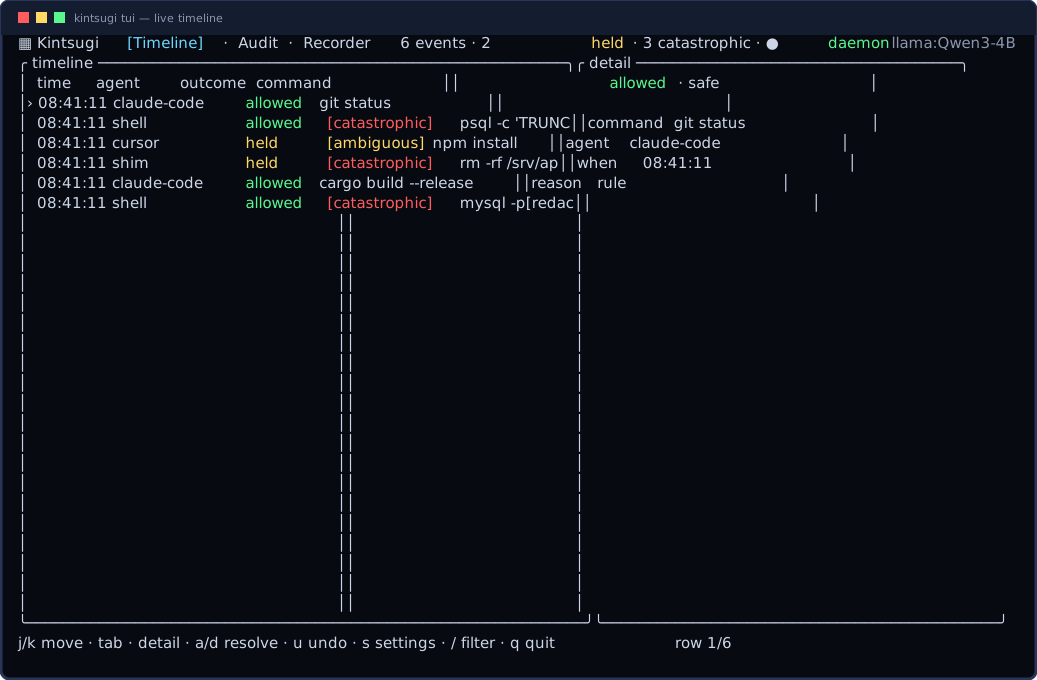
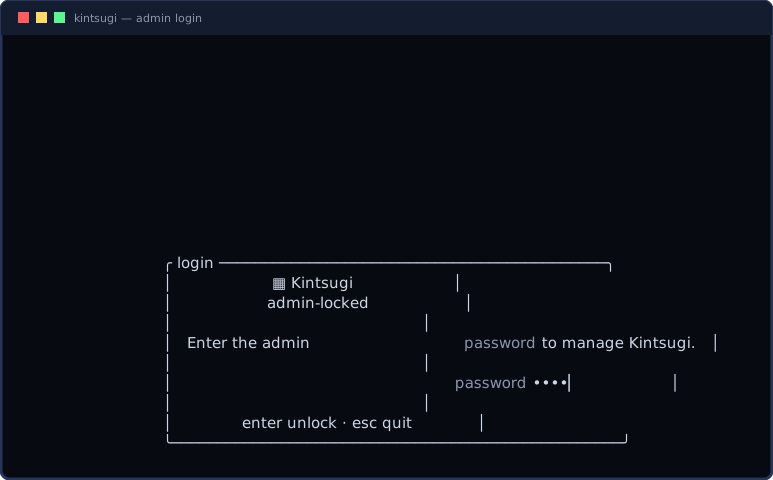
Everything above has one operator surface. kintsugi tui is a real, branded ratatui app over the live event log — tabbed views, a vitals strip, one-key approve / deny / undo, a password login when the vault is locked, and an in-app settings panel.
Tabbed views
Timeline (everything), Audit (a destructive-only lens), and Recorder (passively recorded human shell sessions) — switched with Tab / 1 / 2 / 3.
Vitals strip
A header strip shows global counts (events / held / catastrophic) and daemon + scorer health — worded so nothing depends on color.
Password login when locked
When the vault is locked, the TUI requires the admin password (masked, constant-time verified) before showing the app; the password is held zeroized for the session.
In-app settings panel
s opens a control panel listing the locked settings and toggling them — re-sealing the vault under the held password, persisted atomically. Every row is a tightening control.
Keys: j/k move · g/G jump · Space/b page · / filter · enter detail · a/d approve/deny · u undo · s settings · Tab/1/2/3 switch view · q quit. One reserved danger accent, every state paired with a word, and NO_COLOR honored — calm until it must shout.
> bring-up order
A locked, self-healing, audited host comes up in four commands — each one optional, each independently useful:
kintsugi init              # wire agents + start the daemon
kintsugi service install   # watchdog: relaunch on kill (uninstall is gated)
kintsugi record install    # passive human-shell recorder → audit chain
kintsugi admin provision   # seal settings · "password to stop" · recovery key

kintsugi tui              # the control room
New here? Start with the install & wiring guide, see every feature with a real captured frame on features, or read the measured security assessment. Full design rationale and the complete threat matrix live in kintsugi-admin-recorder-design.md.